



Can a Windows PC with just 8GB of RAM run a local language model through LM Studio? In our real-world test, yes—but it was not consistently comfortable. On a 2017-generation laptop with an Intel Core i7-7700HQ, 8GB of RAM and an NVIDIA GeForce GTX 1050 with 4GB of VRAM, we ran the quantized Qwen3.5 4B model locally, including without an internet connection.
The most striking result was the difference between thinking enabled and disabled: with Think ON, the interface displayed 17 minutes 50 seconds of reasoning without a final answer in the observed run; with Think OFF, a response was produced in about 21.5 seconds at approximately 9.72 tokens per second. This is one hardware/model/configuration test, not a benchmark for all PCs.
We translated and adapted our original Japanese hands-on report. The test itself took place September 29, 2026. LM Studio’s current official system requirements continue to recommend at least 16GB RAM on Windows. English article reviewed November 8, 2026.
Test PC and actual results
| Component | Our test setup |
|---|---|
| CPU | Intel Core i7-7700HQ (4 cores / 8 threads, AVX2) |
| Memory | 8GB RAM (7.86GB usable) |
| Dedicated GPU | NVIDIA GeForce GTX 1050, 4GB VRAM |
| Storage | Approx. 477GB PCIe SSD |
| Operating system | 64-bit Windows |
| Model | Qwen3.5 4B GGUF, Q4_K_M quantization |
| Downloaded model size | Approx. 3.38GB |
| Measurement | Observed value |
|---|---|
| LM Studio model run | Successfully loaded and generated a response |
| Think ON | 17 min 50 sec shown; no final response within the observed run |
| Think OFF | About 21.5 sec equivalent, 9.72 tokens/sec, 203 output tokens, 0.61 sec first-token metric |
| Memory pressure | Approximately 91% system RAM used after an LM Studio answer |
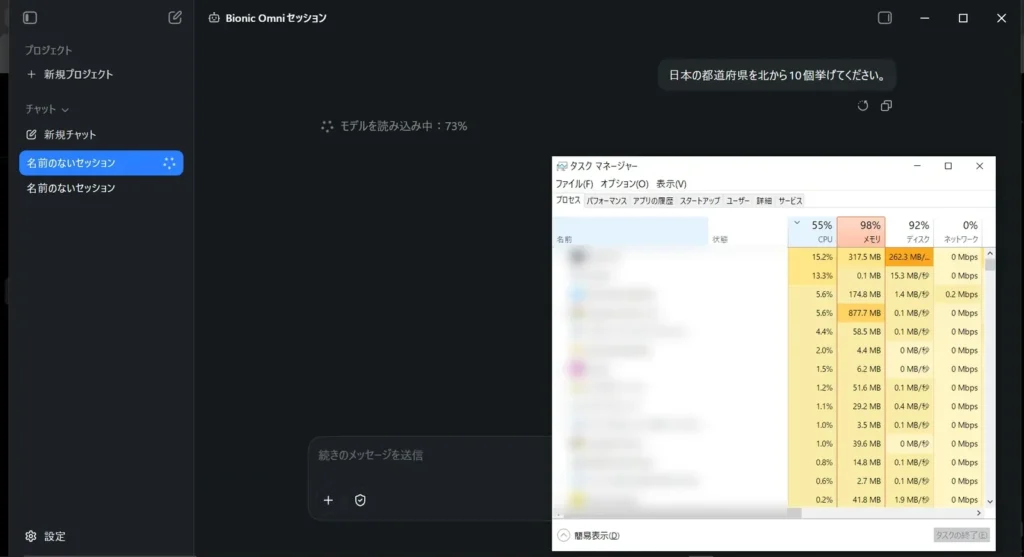
| Bionic load | Around 98% RAM in the observed loading state |
| Bionic earlier trial | 3 min 3 sec displayed including model load |
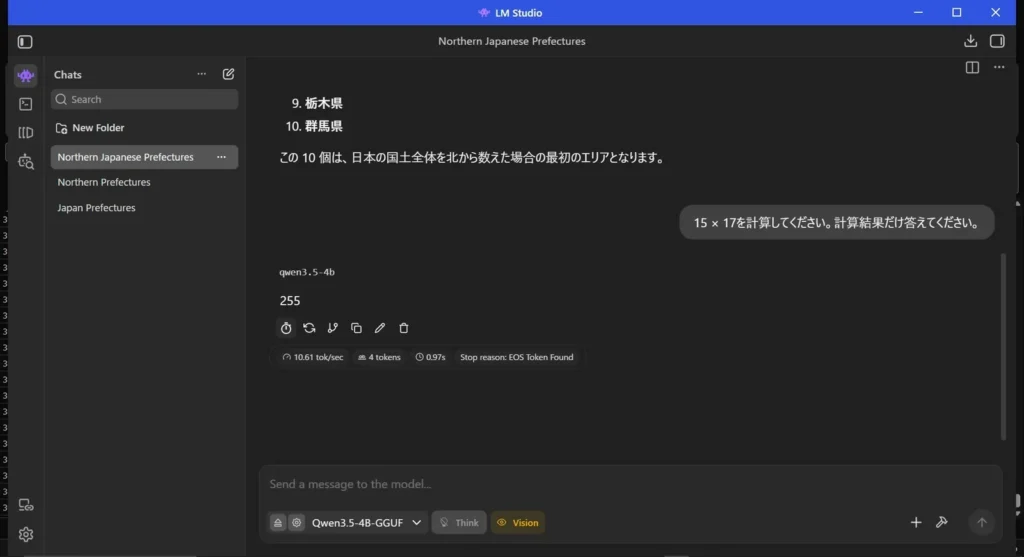
| Internet disconnected | Answered a calculation and text-generation prompt in airplane mode |
| Quality | Generated Japanese text, but some responses contained mistakes or overconfident claims |
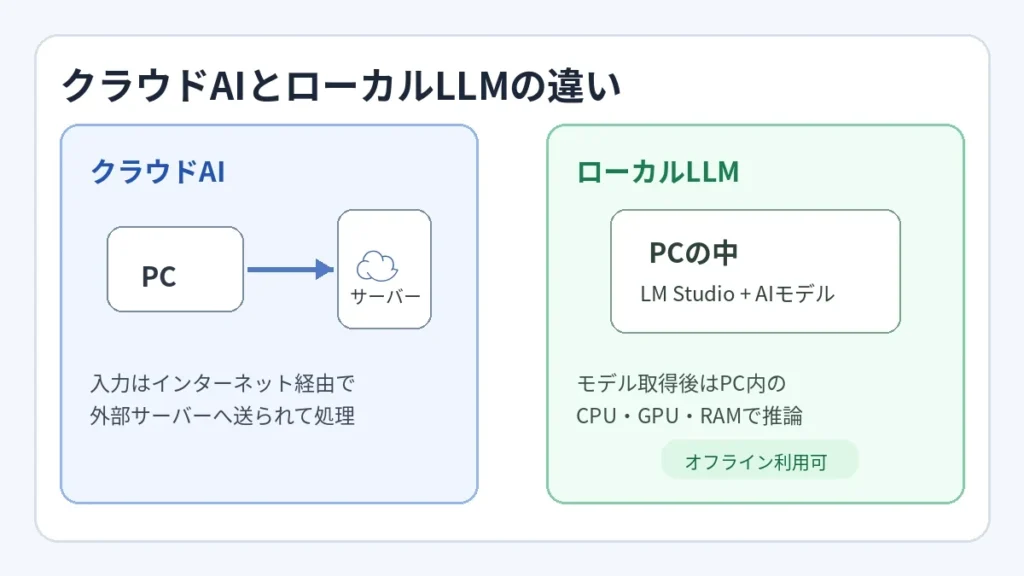
Why an 8GB PC can run a model despite the 16GB recommendation
LM Studio’s official requirements list AVX2 CPU support as required on Windows x64, at least 16GB RAM recommended, and at least 4GB dedicated GPU VRAM recommended. “Recommended” is not identical to a hard minimum. Small or quantized models may run on less memory, but Windows itself, the model, its context cache and other applications compete for the same resources.
A roughly 3.38GB quantized model file does not guarantee that runtime RAM consumption will stay below 3.38GB. Memory mapping, GPU offload, KV cache, context length, active processes and runtime allocation all matter. A system reaching 91–98% memory pressure may become unresponsive or start paging heavily, even if the model technically loads.
What is a local LLM and what stays offline?
A local large language model runs inference on your own CPU/GPU rather than sending every prompt to a hosted model. LM Studio supports searching and downloading models, then loading them locally and chatting through its desktop interface. After you have downloaded the required model and installed the app, many local inference tasks can work without an internet connection.
This does not mean every feature or installed model is safe by default. Software and model provenance, licensed use, prompt privacy, local server exposure and model inaccuracies remain important. A local server listening on an unintended network interface can create its own security risk. See LM Studio’s offline documentation.
How we tested LM Studio with Qwen3.5 4B
First, we tried Bionic
We initially evaluated Bionic, a separate LM Studio-associated application experience. We selected Qwen3.5 4B and watched the startup and memory behavior. The first displayed work session reached approximately 3 minutes 3 seconds including model loading. Bionic is not required to use LM Studio itself; beginners can start with the main LM Studio desktop app.
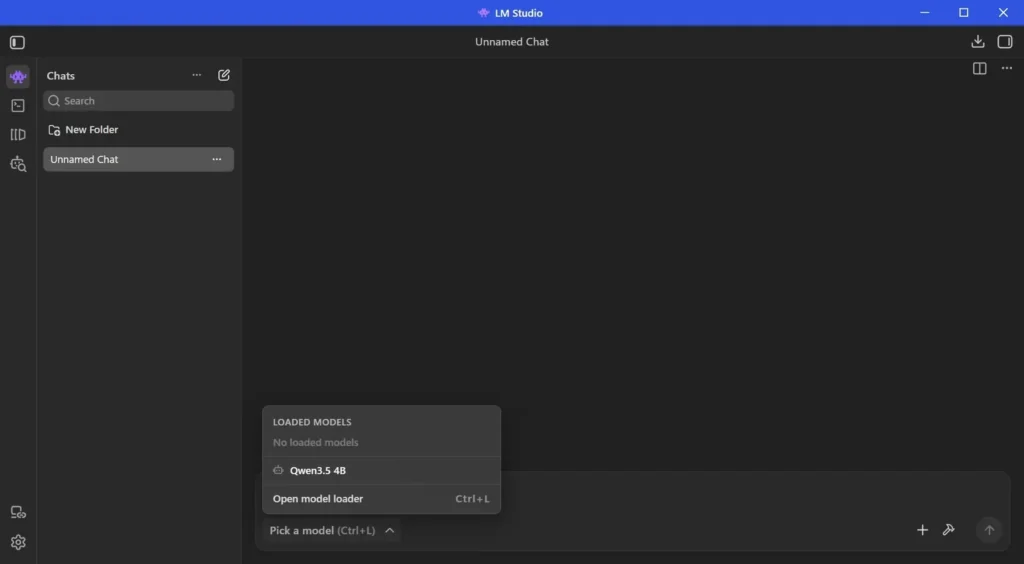
Then we loaded the same model in LM Studio
- Install LM Studio from the official site and confirm that your processor supports AVX2.
- Open the model discovery interface and search for a small model suitable for your RAM budget.
- Choose a trusted, compatible GGUF model and a quantization that is small enough for your machine. Our example was Qwen3.5 4B Q4_K_M.
- Load the model in the chat interface. Start with a modest context length and close unnecessary memory-intensive applications.
- Ask a short, factual prompt and measure first-token latency, output tokens and total response time.
- If the model supports a thinking/reasoning mode, compare the effect of that mode rather than assuming it is always faster.
- Inspect Task Manager while the model is loaded and during generation.
- Only increase context size, quantization quality or parallel sessions once the basic configuration is stable.
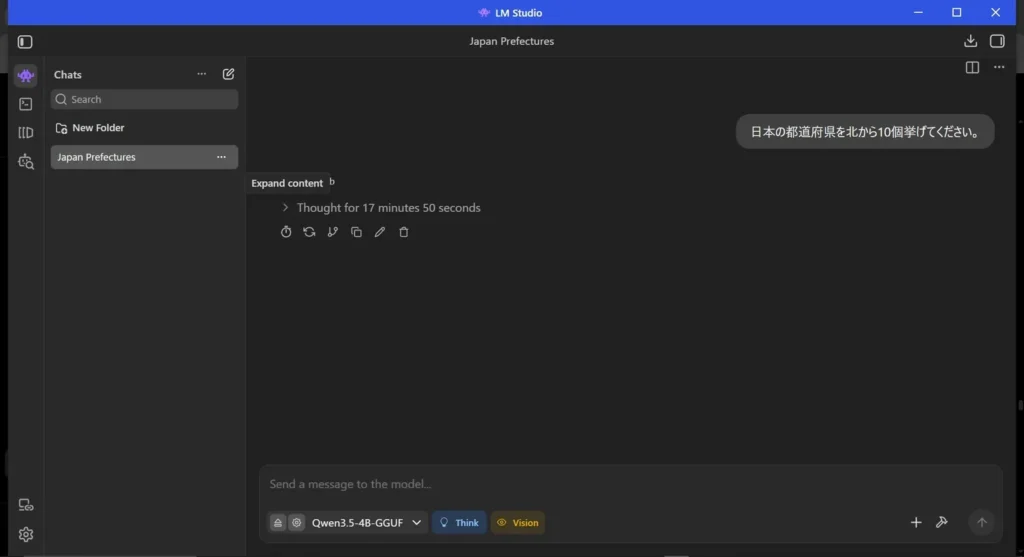
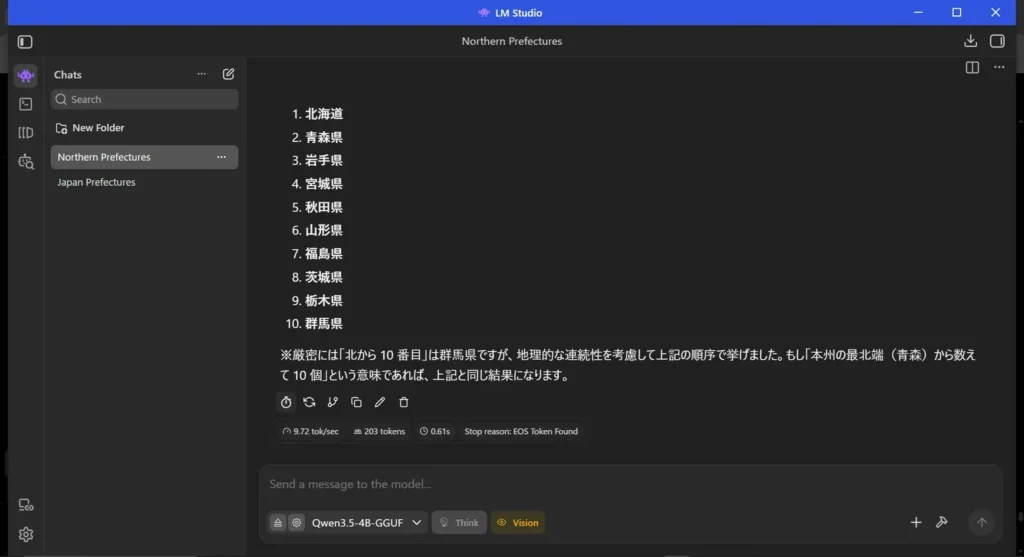
Why did turning Think OFF improve the test so dramatically?
Reasoning-oriented models may generate large amounts of internal or intermediate reasoning before a final answer, and smaller PCs can struggle with the longer inference path and larger KV cache. Reducing reasoning mode can cut the number of generated tokens and apparent delay for straightforward questions. That is a configuration-dependent trade-off: for complex tasks the output quality may change, and disabling a mode is not universally optimal.
We did not establish that LM Studio itself caused the 17-minute behavior, and we did not conduct a controlled multi-run benchmark. The difference is an observed result on this specific machine and prompt setup.
We verified that the local model still answered offline
After the model was downloaded and loaded, we put Windows in airplane mode. The local model still answered calculation and text questions, which supported the conclusion that this test’s inference did not depend on sending prompts to a remote cloud service. This does not prove that every plugin, feature or third-party model has the same network behavior.
LM Studio vs. Bionic: which should a beginner choose?
| Question | LM Studio desktop app | Bionic in our test |
|---|---|---|
| Best starting point | Yes; use Discover, Load, Chat | Optional separate environment |
| Additional installation required for LM Studio? | No | No—Bionic is not a prerequisite |
| Observed performance | Think OFF ~21.5 sec in our test | Initial trial included ~3 minutes of loading and work |
| Memory use | High on 8GB | Extremely high in one loading state |
| Recommendation | Start with LM Studio’s basic workflow | Use only if its additional experience fits your needs |
Troubleshooting an 8GB local AI setup
- Model fails to load: choose a smaller model or lower quantization, reduce context size and check AVX2 compatibility.
- Windows becomes sluggish: inspect memory, GPU VRAM and paging; close other applications or increase RAM if available.
- Inference takes minutes: reduce generated output, reasoning mode and context length; test a simpler prompt.
- Results contain errors: verify factual answers independently; local does not mean reliable or current.
- Offline mode fails: ensure model weights are already downloaded and no connected tool or cloud endpoint is required.
- GPU is underutilized: inspect offload settings, driver compatibility and whether the workload is bound by RAM/CPU speed.
FAQ
Does LM Studio cost money?
LM Studio provides a free way to run local models, with licensing and usage governed by its current terms. Individual model licenses may impose separate conditions; check the model card and the app’s official pricing before organizational use.
Can an 8GB laptop actually be usable for local AI?
It can work with a carefully selected small model, as this test shows, but there is little headroom. Our results should not be used to guarantee comfortable operation on another laptop.
Do I need to install Bionic first?
No. The standard LM Studio application can discover, download, load and chat with local models without installing Bionic.
Can local AI leak confidential data?
Local inference reduces certain cloud-transfer risks, but a connected plugin, logging system, exposed local server, untrusted model or copied output can still create security risks. Apply ordinary workstation and data-classification controls.
Sources and test limitations
- LM Studio: Windows requirements
- LM Studio: basic app workflow
- LM Studio: offline mode
- LM Studio: current pricing
- Original Japanese hands-on report and all screenshots
Test date: September 29, 2026. English adaptation reviewed November 8, 2026. Numbers are observations from one PC, not standardized benchmarks, and no additional English-language benchmark was performed.