



Updated November 15, 2026. Cursor has explained how attackers used credentials exposed through AI infrastructure provider Fireworks to tamper with the Anthropic Claude Code extension distributed from Cursor’s extension marketplace. The malicious Windows and macOS builds tried to plant a persistent SSH backdoor. Cursor says the incident is contained, but some previously affected developer machines may still need remediation. This guide separates the extension attack from the related historical-data exposure and shows what to check.
What to do first: If you installed or automatically updated Anthropic.claude-code version 2.1.312 or 2.1.313 through the Cursor VS Code extension marketplace during the October 29, 2026 exposure window, consult Cursor’s official advisory, check for the svc-telemetry SSH key and other indicators, and use Cursor’s platform-specific remediation guidance. Uninstalling or updating the extension alone might not remove the persistent artifacts.
| Key question | Verified answer |
|---|---|
| Which extension? | Anthropic.claude-code 2.1.312 and 2.1.313, malicious copies served through the Cursor marketplace on Windows and macOS. |
| When? | October 29, 2026, roughly 2:27 a.m.–1:35 p.m. Pacific Daylight Time (approximately 11 hours). |
| How many? | Up to 5,000 users requesting affected cached versions may have received malicious builds; this is not a confirmed count of infected devices. |
| What did it attempt? | Host reconnaissance, insertion of an unauthorized SSH key, a reverse SSH tunnel and reboot/startup persistence. |
| Is Anthropic’s genuine extension compromised? | No evidence of compromise to Anthropic’s own distribution; Microsoft confirmed its VS Code Marketplace and npm distribution were unaffected. |
| What is new? | Cursor’s November 13 report traces the attack back to a Fireworks-related credential exposure and discloses additional limited data access. |
Am I affected by the malicious Cursor Claude Code extension?
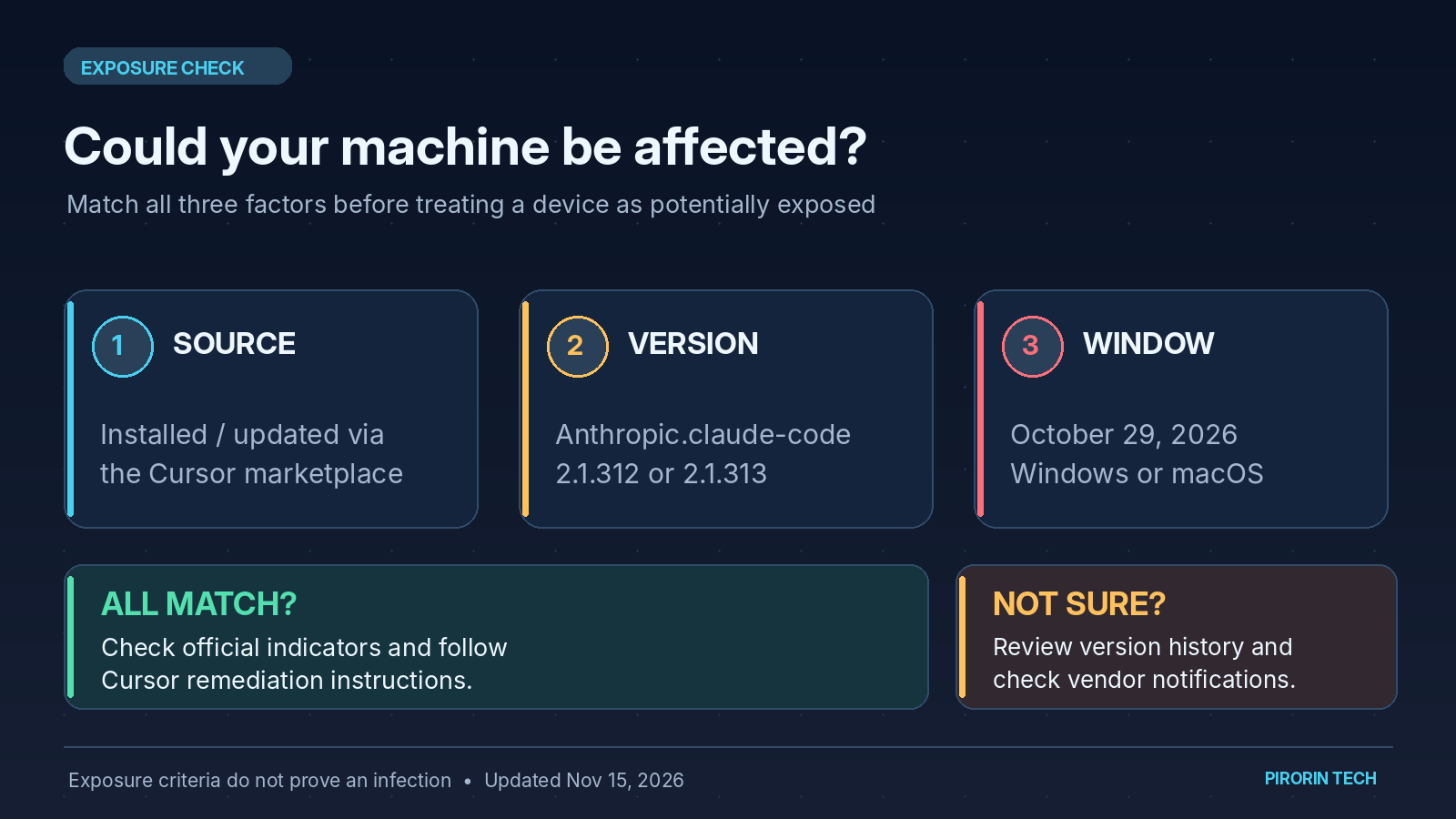
The initial extension-specific warning concerns Windows or macOS users who obtained the two named versions from Cursor’s own extension marketplace during the October 29 window. The distribution source matters: simply using Claude Code, Cursor, or a matching version number does not establish that you received the trojanized file. Conversely, an extension that has since auto-updated may hide an earlier exposure.
- Open Cursor’s Extensions panel. Locate the installed Claude Code extension and record the publisher ID (
Anthropic.claude-code) and installed version. - Identify the installation source and timing. Check any available extension-installation records, endpoint inventory and deployment logs. Determine whether the extension came through Cursor’s marketplace on October 29, not merely whether Claude Code is currently installed.
- Check host indicators. Look for the unauthorized SSH key and related startup artifacts below. If there is possible exposure, use Cursor’s official validation and remediation scripts.
- For managed environments, hunt across all developer endpoints. Include automatic extension updates and systems where the current version has already changed.
Time zone reference: Cursor’s reported window of 2:27 a.m.–1:35 p.m. PDT on October 29 corresponds to approximately 18:27 JST on October 29 through 05:35 JST on October 30. Treat these as approximate times, consistent with Cursor’s wording.
Quick checks: Windows PowerShell and macOS Terminal
Cursor’s published indicator is an unexpected SSH public key labeled svc-telemetry. The following commands inspect the relevant authorized-keys files; they do not install anything or make changes.
Windows — PowerShell
$files = "$HOME\.ssh\authorized_keys", "C:\ProgramData\ssh\administrators_authorized_keys" | Where-Object { Test-Path $_ }
if ($files -and (Select-String svc-telemetry $files)) {
  "svc-telemetry key found"
} else {
  "No matching key found in the checked files"
}
macOS — Terminal
grep -n "svc-telemetry" ~/.ssh/authorized_keysIf the key is found, treat the device as potentially compromised and follow incident response procedures. A negative result from a single key search is not a full forensic clearance: review the extension’s installation history, persistence artifacts and network telemetry as well. The official scripts and full indicators are maintained in Cursor’s advisory.
Other indicators worth checking
| Platform / category | Reported indicator |
|---|---|
| macOS startup persistence | ~/Library/LaunchAgents/com.apple.sysmond.plist |
| Windows task or startup | Scheduled task SysMon; Startup entry sysmon.cmd |
| Windows dropped files | %USERPROFILE%\.config\smt.cmd and %USERPROFILE%\.config\smtk |
| macOS / Unix-like dropped files | ~/.config/.smt and ~/.config/.smtk |
| Network | Attacker endpoint 134[.]209[.]82[.]225, including reported SSH and HTTP beacon activity |
| Unauthorized SSH key | Key comment svc-telemetry; published fingerprint SHA256:0Z6R+DF64Do2nwQic8a7kkfDLNNk4IiK+2U2Rci4htk |
These are indicators of compromise, not a claim that every listed action succeeded. Some names can resemble legitimate monitoring tools; confirm the full path, file contents and surrounding activity before attributing an artifact. Cursor also provides malicious VSIX SHA-256 hashes for each affected operating system and version in its advisory.
How to remove the backdoor and recover safely
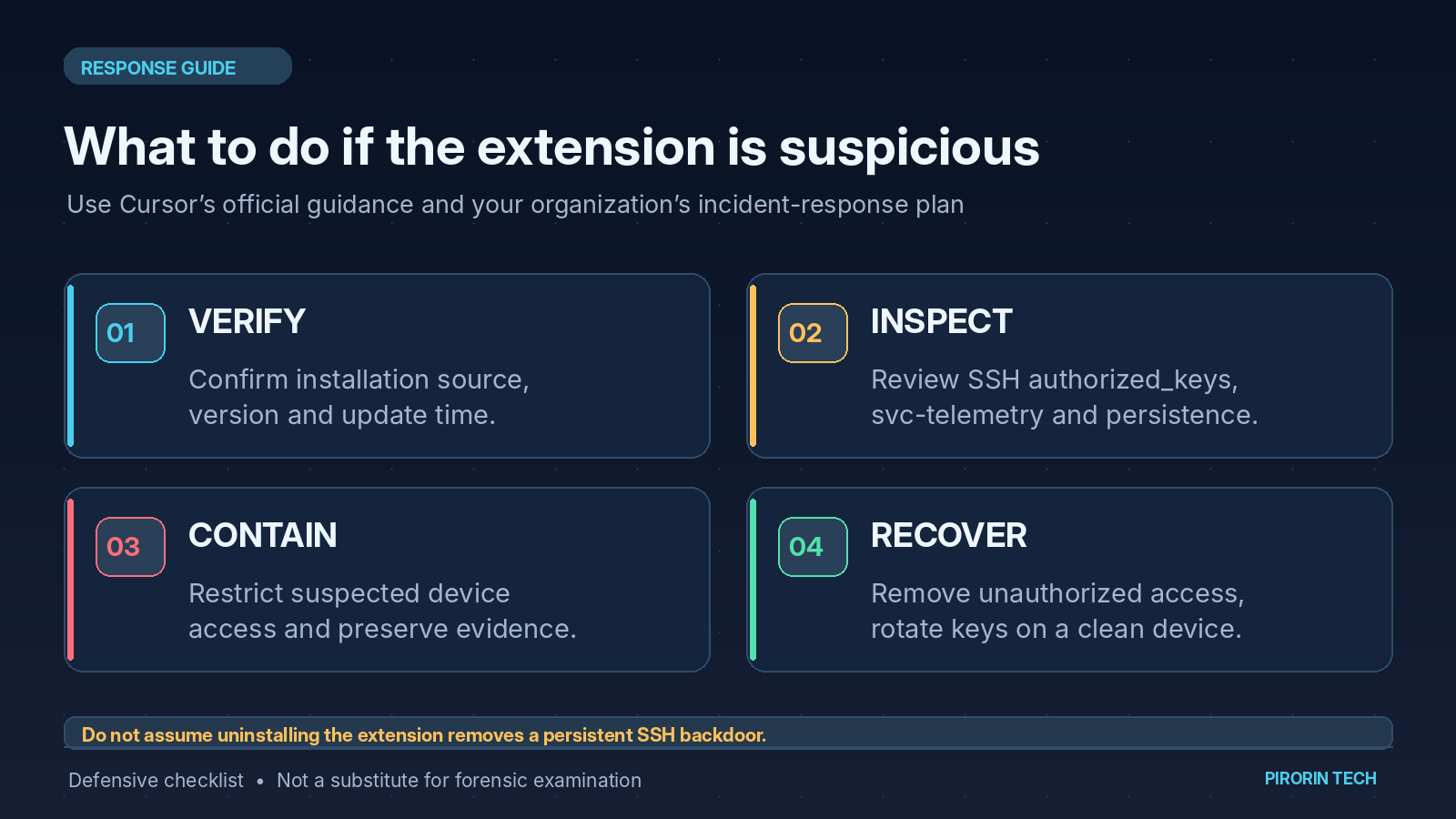
Cursor provides two remediation scripts directly from its security notice: remediate-windows.ps1 for Windows and remediate-macos.sh for macOS. Download them only from the links on Cursor’s official advisory, inspect and test them under your organization’s change-control policy, and follow the execution instructions there. Avoid third-party copies or outdated snippets.
- Contain: isolate any device with evidence of malicious execution or persistent remote access, coordinating with your security team.
- Preserve evidence: retain extension inventory, relevant operating-system logs, endpoint alerts, task/LaunchAgent details, SSH configuration and available network records before cleanup.
- Remediate: remove the malicious extension build, the unauthorized SSH key, dropped persistence scripts, startup tasks and any suspicious tunnel processes. Use the official script and verify its result; consider rebuilding a host when trust cannot be re-established.
- Rotate secrets from a known-clean device: investigate any accessible GitHub tokens, CI/CD secrets, cloud credentials, developer API keys and authenticated sessions. Revoke exposed credentials at their issuing service; deleting a local file is not sufficient.
- Validate and monitor: check that persistence does not reappear, review access logs for misuse and tighten extension allowlisting, least privilege and secrets-management controls.
Important technical distinction: Microsoft found that the injected code reported environment-variable names rather than their values in the reconnaissance callback. That observation does not rule out credential theft if an attacker achieved remote access, and it is separate from the historical API credentials disclosed in Cursor’s November 13 incident report.
What happened technically? The five-stage supply-chain attack
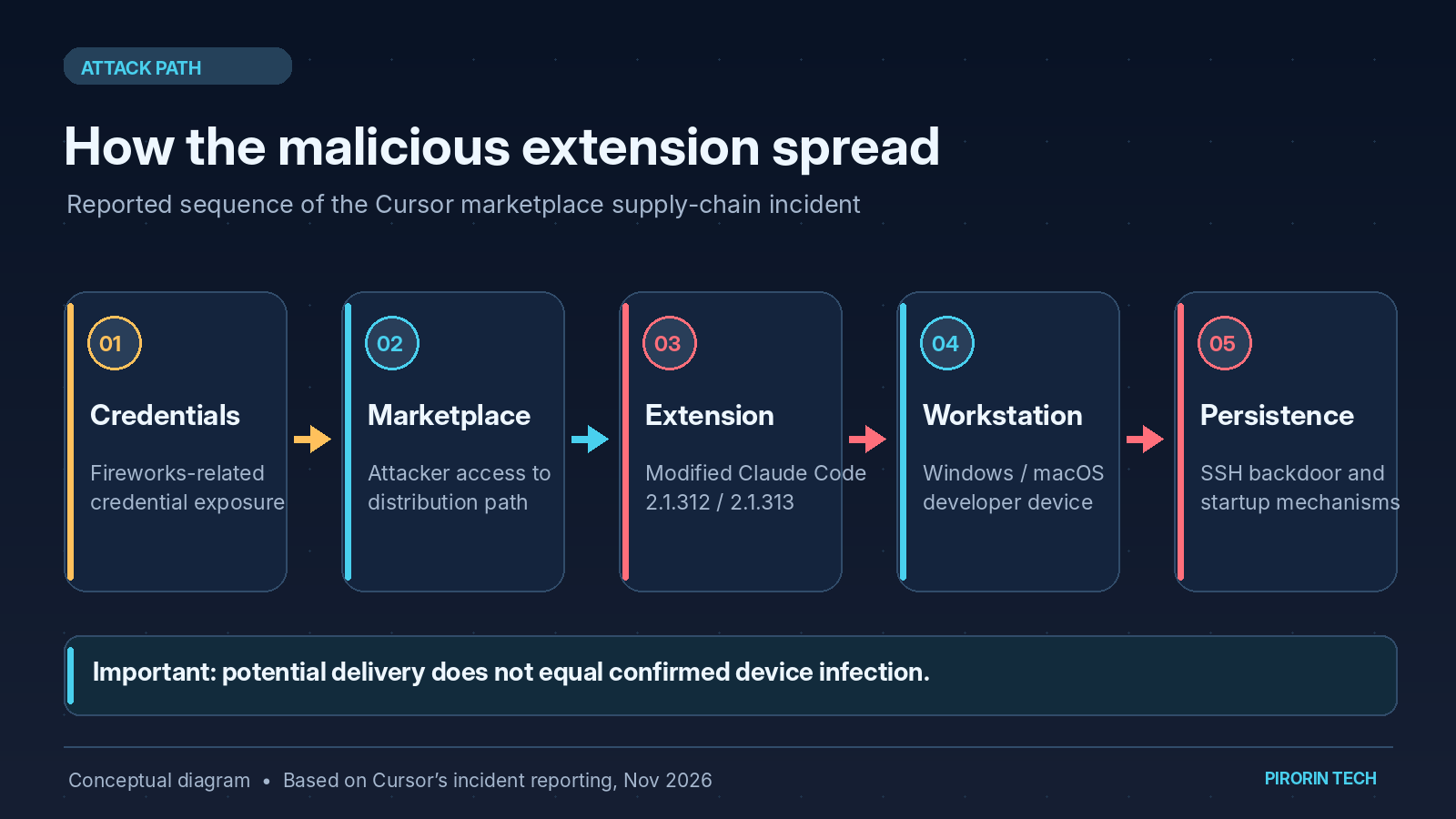
Microsoft analyzed the tampered extension’s JavaScript. Its injected loader ran before the extension’s expected initialization and attempted the following sequence:
| Stage | Observed code behavior | Why it matters |
|---|---|---|
| 1. Reconnaissance | Collect host, OS, user, working directories, Git identity and selected environment-variable names. | Profiles the developer workstation. |
| 2. SSH authorization | Append an attacker-controlled public key to authorized_keys. | Prepares a possible account-entry mechanism. |
| 3. Reverse SSH | Try to enable SSH and establish outbound reverse forwarding to an attacker server. | Could expose a local SSH port through a remote endpoint. |
| 4. Persistence | Create macOS LaunchAgent or Windows task/startup scripts; retry the connection about once per minute. | Makes artifacts survive the extension’s removal or device restarts. |
| 5. Reporting | Attempt to send collected system details to the remote endpoint. | Provides the operator with host reconnaissance. |
The attack was not uniformly successful. Cursor and Microsoft report that permission requirements and errors in the malicious code would prevent some remote-login steps on many ordinary Windows and macOS installations. This is not a reason to skip cleanup: unauthorized key entries, persistence artifacts and host-data reporting may have occurred independently. Cursor says it worked with the hosting provider to take the attack server offline.
November 13 investigation: how Fireworks exposure led to the extension attack
Cursor’s later incident report explains the broader chain, which is separate from the malware’s actions on individual developer machines:
- An attacker obtained an access key that Cursor had issued to AI infrastructure provider Fireworks, according to Cursor.
- The key gave access to a read-only bucket containing limited historical coding-agent traces, mostly from 2025, from sessions not in Privacy Mode and available for permitted model training.
- Some traces contained unredacted credentials. The attacker used exposed credentials to reach selected Cursor SaaS tools and access limited internal/support/business information.
- With a further stolen credential, the attacker tampered with the cache serving Cursor’s VS Code extension marketplace and placed unauthorized copies of Claude Code there on October 29.
- Cursor disabled the poisoned distribution, notified customers, rotated credentials and rebuilt the marketplace. It reports that the last observed attacker activity on November 1 was blocked and considers the incident contained.
This was not a compromise of Anthropic’s legitimate extension source or the upstream Open VSX marketplace. Microsoft likewise reports that the malicious builds were not published to Microsoft’s Visual Studio Marketplace or npm @anthropic-ai/claude-code. Fireworks separately published its own October 2026 security-incident update; the detailed downstream Cursor attack sequence above is attributed to Cursor’s investigation.
Was my Cursor chat history, API key or source code exposed?
Cursor disclosed distinct, narrowly scoped data impacts. Do not confuse these percentages with the up-to-5,000 extension-download estimate.
| Data / service | Cursor’s November 13 finding |
|---|---|
| Historical non-Privacy-Mode coding-agent traces | Exposed for fewer than 0.05% of users; Cursor says it notified each affected user. |
| API credentials within historical traces | Exposed for fewer than 0.01% of customers; affected administrators received credential-rotation details. |
| Other accessed information | Selected archived non-production Cursor repositories, support conversations, some usage/contact data, some coding-agent summaries and some credentials submitted to support. |
| Privacy Mode prompts and code | Cursor says these were not affected. |
| Customer code repositories, Cursor app releases, production systems and live traffic | Cursor says these were not compromised or affected as described in its report. |
If you received a Cursor incident notice, follow its account-specific guidance and rotate any named credentials from a trusted device. If you did not receive a notice, Cursor says your coding-agent trace data was not among the identified exposed traces. This notification assessment is separate from the extension-installation checks above; organizations should still inventory affected workstations if they used Cursor’s marketplace during the exposure window.
FAQ
Does using Claude Code in VS Code mean my computer was hacked?
No. The confirmed malicious distribution was limited to specified cached builds from Cursor’s marketplace during the October 29 window. Microsoft says its own VS Code Marketplace and npm distribution were unaffected. Check your install source and timing before drawing conclusions.
Will upgrading or uninstalling Claude Code fix the problem?
Not necessarily. The malicious extension could write startup scripts or SSH keys outside the extension’s own files. Follow Cursor’s remediation instructions rather than relying on a version update alone.
Do I need to reset all API keys immediately?
Use the incident notices and endpoint investigation to prioritize. Credentials identified as exposed should be revoked or rotated; a host with credible backdoor execution may require broader credential/session rotation. Cursor says it separately contacted affected customers and administrators about specific credentials.
Is the attack still active?
Cursor’s November 13 report says it believes the incident is contained and that the last observed attacker activity on November 1 was blocked. It also took down the malicious marketplace builds and attack server. A contained distribution incident does not guarantee an individual machine has been cleaned.
Sources and verification record
- Cursor — An update on our recent security incident (November 13, 2026; primary incident investigation)
- Cursor — Security notice: malicious Anthropic.claude-code 2.1.312/2.1.313 (October 29; indicators and vendor remediation links, updated October 30)
- Microsoft Security — Inside a malicious Claude Code-branded extension and its persistent SSH backdoor (October 30; independent technical analysis)
- Fireworks AI — Update on October 2026 security incident (updated November 9; provider’s security bulletin)
Fact-checked against the linked primary sources on November 15, 2026 (Japan time). This article does not claim to have executed the vendor scripts on a test machine. The affected-install count is a potential-exposure upper bound, not a confirmed number of compromised workstations.
Related coverage: Notion AI: checking historical chat and API-key exposure after the Fireworks incident (a separate service-specific impact; not evidence that all Cursor users or Notion users were affected).