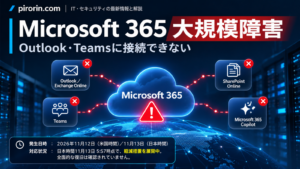



UPDATED NOVEMBER 15, 2026 (JST): Microsoft says the global Microsoft 365 outage that began on November 12 in North America (November 13 in Japan) has been resolved. The disruption affected Outlook/Exchange Online and some Microsoft Teams, SharePoint and Microsoft 365 Copilot functions. Microsoft attributed the incident to a technical issue linked to an earlier network capacity upgrade and a later network change, not to a cyberattack or AI agents. Earlier recovery updates preserved below are historical snapshots.
Microsoft 365 outage resolved: What changed on November 14?
Microsoft declared the broad Microsoft 365 incident resolved on Saturday, November 14, 2026. A Japanese university consortium’s published copy of Microsoft’s incident notification records 1:17 p.m. Japan Standard Time on November 14 as the update marked “Service has been restored” for incident MO1550821. The consortium reports local restoration at 1:10 p.m. JST. Microsoft subsequently said it had restored service to the remaining impacted customers and regions worldwide.
The incident affected Exchange Online/Outlook, Exchange-dependent Microsoft Teams features, some SharePoint integrations, Microsoft 365 Copilot and other connected workloads. Not every user or every feature was down for the entire outage. Enterprise administrators should review both MO1550821 and Exchange Online incident EX1550543 in their tenant’s Microsoft 365 Service health dashboard.
What caused the global Outlook and Microsoft 365 outage?
Microsoft explained that a problem introduced during an earlier network capacity upgrade surfaced following a recent network change. During the incident, some servers unexpectedly became unavailable, placing extra demand on the remaining capacity. A core process on affected servers also became overwhelmed, making them unresponsive and contributing to the loss of available service capacity.
Engineers addressed the underlying issue and progressively brought infrastructure back, adjusting traffic paths and workloads while verifying stability at each stage. Microsoft explicitly said this was a technical incident unrelated to cyber activity or AI/agents. The specific implementation defect and longer-term preventive measures have not yet been fully documented in the promised post-incident report; neither a particular misconfiguration nor a security breach should be inferred.
Outlook works again, but an email or verification code is missing: What to check
- For users: Recheck important messages sent during the incident and confirm delivery through another trusted channel if necessary. For delayed, expired verification codes, request a new code using the service’s official sign-in flow.
- For administrators: Review tenant-specific Service health notices, use Exchange Online message trace and targeted send/receive tests to check for delayed or failed mail, and confirm recovery of Teams calendar, Copilot, SharePoint and other dependent business workflows separately.
- Delivery is not guaranteed merely by the restoration announcement: Microsoft’s temporary extension of the email timeout window to 48 hours was intended to preserve queued messages. It was not a promise that every message would be delivered within that period.
Verified November 15, 2026 (JST). Sources: Microsoft MO1550821 incident notices reproduced by the Tokai National Higher Education and Research System (November 14, 1:17 p.m. JST); Microsoft Service Health Status; and reporting of Microsoft’s global restoration confirmation (November 14). All recovery-in-progress bulletins further below retain their original dates for historical context.
English edition, updated with November 14 restoration and cause: Outlookに接続できない・Teamsが使えない|Microsoft 365大規模障害【11月13日】原因と復旧状況. Originally translated from the November 13 report; both editions now include the November 14 resolution. Time-stamped updates below are historical snapshots, not live recovery estimates.
Archived November 13, 3 p.m. JST update: Recovery was still in progress at that time
According to Microsoft’s notices at approximately 3:16 p.m. JST on November 13, both the Outlook/Exchange Online incident EX1550543 and the wider Microsoft 365 incident MO1550821 remained classified as service degradation. Some users and regions were seeing partial recovery, but Microsoft had not confirmed a complete restoration or announced a definitive time to full recovery.
Microsoft’s response: The company was investigating overloaded and unresponsive servers by testing traffic throttling, protocol adjustments and alternate routing. It was also reproducing traffic patterns in a restricted environment to isolate the cause and measure the effectiveness of possible remedies. Microsoft said it had found no indication that malicious activity caused the incident. The root cause had not yet been established.
At the time of those notifications, the next information updates were scheduled for 4:00 p.m. JST (MO1550821, the broader incident) and 4:30 p.m. JST (EX1550543, Outlook/Exchange Online). These were bulletin update times, not expected service restoration times. The times are retained here to accurately reproduce the November 13 report, and may now be in the past.
For changes after the reported times, use Microsoft’s public service status. Employees and school administrators should check Microsoft 365 admin center > Service health for the incident IDs and tenant-specific impact. A general public status page can look healthy even when individual tenant-level incident notices remain open.
Outlook email not arriving? Verification codes and two-step login may also fail
Microsoft’s notices warned that email delivery through Exchange Online could be delayed. In addition to Outlook itself failing to load, users might be unable to sign in to otherwise functioning services because a one-time passcode sent to their affected mailbox never arrives. On November 13, Otsuka Corporation’s customer notice said some customers using Microsoft-based email were experiencing delayed or missing authentication messages, affecting two-step sign-in to its customer portal and new Otsuka ID registrations.
- Can’t receive email: Confirm whether you use Outlook.com, a Microsoft 365 organizational mailbox or another email provider. Check your inbox, junk folder and any available quarantine, but if the mailbox will not open, start with the relevant service health notice.
- One-time code missing: Avoid requesting dozens of replacement codes in quick succession. Follow the service’s expiry and retry instructions. If you already enrolled an approved authenticator app or another permitted verification method, try it instead; do not bypass account security.
- A sent message has not reached its recipient: Review Drafts, Outbox and Sent Items, and where necessary confirm delivery with the recipient by phone or another company-approved channel. A message appearing in Sent Items does not prove it reached its destination. Repeated resends may cause duplicate delivery.
- Only the Outlook app appears broken: You can test Outlook on the web once. However, Microsoft’s incident also affected the web interface, so it is not a guaranteed workaround. Avoid deleting Outlook profiles or reinstalling Microsoft 365 Apps just because the cloud service is degraded.
Confirmed cases in Japan: Kyoto University, Hiroshima University and Otsuka Corporation
Several Japanese organizations published incident notices about email or associated Microsoft services. These are confirmed individual cases, not a measure of the total number of affected people in Japan.
| Organization | Reported problem | Official source |
|---|---|---|
| Kyoto University | Disruptions to student KUMOI mail/Outlook and access to Teams, OneDrive and related services. | Kyoto University’s official notice |
| Hiroshima University | Outlook mail for ‘@office’ and ‘Hiroshima University Mail’ was unavailable. | Hiroshima University’s official notice |
| Otsuka Corporation | Delayed/missing authentication emails blocked some two-factor logins and new customer registrations. | Otsuka Corporation’s customer notice |
Were all Teams and OneDrive functions down? Not necessarily. Microsoft’s broad notice said most core Teams chat and meeting functions were generally unaffected, while features depending on Exchange Online—such as calendars, meeting invitations and some Copilot operations—could fail. Direct access to files stored in SharePoint was generally described as available. Kyoto University’s operational notice nevertheless listed Teams and OneDrive among affected services. A product’s general service status and a particular organization’s actual experience need not be identical.
Source check: November 13, approximately 3:14–3:16 p.m. JST for MO1550821/EX1550543, plus the Japanese organizations’ primary announcements. Incident notifications are also reproduced in University of Pennsylvania’s public copy of Microsoft admin-center incident notifications.
November 13 update: Bank one-time codes not arriving—Rakuten Bank, Japan Post Bank and GMO Aozora Net Bank
The Microsoft 365 outage also affected banking procedures that depend on verification messages delivered to Outlook or other affected Microsoft-hosted inboxes. On November 13, Rakuten Bank, Japan Post Bank (Yucho Bank) and GMO Aozora Net Bank posted notices about related email-delivery problems. These announcements did not say the banks’ core banking systems were generally down. The affected customers were those unable to receive the necessary messages through their email service, not every account holder.
| Bank | Who and what were affected? | What the bank advised |
|---|---|---|
| Rakuten Bank | Users unable to receive emailed one-time keys. Some login and bank-transfer verification steps could not be completed. | Wait for mail service recovery. Customers needing an urgent transfer were directed to the bank’s customer service by phone. |
| Japan Post Bank | Affected Outlook email users: Yucho Direct one-time password messages, some Biz Direct notices, Yucho Procedures app workflows, and card/debit application notices. | For certain application procedures, use a non-Outlook address such as a mobile carrier email; this was not a general workaround for every one-time password process. |
| GMO Aozora Net Bank | Outlook email users may fail to receive email tokens needed for transactions and notifications about debit card usage. | Complete email-token-dependent procedures after mail recovery; review debit transactions in online banking if notification emails are missing. |
Rakuten Bank: What if the one-time key for a transfer does not arrive?
Rakuten Bank stated that customers who could not receive the email containing a one-time key might be unable to complete login or fund-transfer verification. For urgent transfers, it listed its customer support numbers as 0120-776-910 from landlines and 0570-064-924 from mobile phones (chargeable), with further options on Rakuten Bank’s November 13 notice. Check the official contact information before calling. A call does not in itself guarantee that a transfer can be completed.
Japan Post Bank: Some applications can use a different email address
In its notice updated at noon JST on November 13, Japan Post Bank said users could use an alternative address, such as a mobile carrier email, for specific services: opening an account or reissuing a passbook/card through the Yucho Procedures app, and online applications for JP BANK Card or Yucho Debit. It did not say that simply switching addresses would solve the Yucho Direct one-time password delivery problem. Consult Japan Post Bank’s November 13 notice (updated at noon) for precise coverage.
GMO Aozora Net Bank: Email tokens and debit-card alerts
GMO Aozora Net Bank warned that users receiving mail through Outlook might miss the email token required for certain account operations. It advised doing those operations once Microsoft 365 email recovered. When debit-card usage alerts did not arrive, it advised users to check the transaction history in online banking. See GMO Aozora Net Bank’s November 13 notice.
What not to do when bank authentication messages do not arrive
- Do not change bank passwords indiscriminately. A receiving-mail outage is not necessarily fixed by resetting credentials.
- Do not hammer the resend button. Multiple delayed codes can later arrive in confusing order; follow each service’s retry interval and expiry time.
- Beware of fake recovery links. Do not use SMS or emailed links claiming to restore the outage; open the bank’s official app or a saved official URL instead.
- For urgent transfers, avoid duplicate transactions. Check the existing transaction history and balance, then contact the bank’s official support channel as needed.
Why this happens technically: Bank authentication depends on a chain: the bank generates a token, sends an email through mail infrastructure, and the recipient reads and enters the token. Even if token generation at the bank works, the user cannot complete the authentication step when access to their mailbox or email delivery fails. This explains how a Microsoft 365 infrastructure problem can disrupt an otherwise separate banking application; it is not evidence of a breach of bank accounts.
Bank-source verification: November 13, 2026. See Rakuten Bank’s November 13 notice, Japan Post Bank’s November 13 notice (updated at noon), and GMO Aozora Net Bank’s November 13 notice. These reflect each institution’s notice as checked on the day; consult the banks for later changes.
November 13, 9:14 a.m. update: Limited regional recovery began
At about 8:58 a.m. JST, Microsoft said some affected servers had been returned to service and were stable, with limited recovery observed in certain regions. Traffic was also being moved through alternative routes. At 9:14 a.m., however, Microsoft had not declared a complete recovery; EX1550543 and MO1550821 still indicated degraded service.
Microsoft said it was optimizing its server recovery workflow and deploying protections intended to reduce traffic pressure at particular locations. If effective, these changes could be expanded. Recovery could occur in stages by region, service and user; apps might require time to reconnect even after backend capacity returned. This is a description of a staged recovery approach, not a promised restoration deadline.
If an application starts working again, verify whether pending messages were actually sent and whether files were saved before retrying to avoid duplication or overwriting. The next MO1550821 bulletin was scheduled for 9:30 a.m. JST at that time—not a promised fix. Source: University of Pennsylvania’s public copy of Microsoft admin-center incident notifications.
November 13, 7:10 a.m. update: Recovery efforts were not delivering the expected result
At about 7:03 a.m. JST, Microsoft said the recovery actions already taken had not produced the expected improvement. It reported that critical processes on some affected servers were overloaded, leaving them unresponsive and reducing available service capacity. This added a server-overload problem to earlier health-check failures.
Microsoft was testing the isolation of some affected infrastructure, restarting associated components and gradually returning traffic while checking service stability. It was also considering regional traffic isolation so that areas could be recovered separately. Full restoration remained unconfirmed at that point.
The broader incident notice also listed affected functionality in Microsoft Intune, Defender for Office 365, Power BI and the Microsoft 365 Apps admin center. For Power BI, it specifically mentioned PDF exports of reports with sensitivity labels; in the Microsoft 365 Apps admin center, Cloud Update, Cloud Policy and Inventory were among the named functions. The appearance of a product on the list did not mean every feature of that product was unavailable.
A separate incident, PP1550869, described intermittent failures in Power Platform flows, apps and connectors relying on Microsoft Graph, potentially including Copilot Studio connectors. The Japanese report did not establish that PP1550869 was directly caused by the broader Microsoft 365 incident.
The notifications available at this early stage scheduled follow-up bulletins for 8:00 a.m. (EX1550543) and 8:30 a.m. (MO1550821). Both were information updates, not recovery deadlines. Source: University of Pennsylvania’s public copy of Microsoft admin-center incident notifications.
Nov. 14, 5:02 a.m. JST update: Microsoft explains the outage trigger; delayed mail may persist after Outlook reconnects
As of 5:02 a.m. Japan time on November 14, 2026, Microsoft reported broad recovery across Microsoft 365 and Exchange Online, but had not confirmed full restoration. Both incidents, MO1550821 and EX1550543, remained classified as service degradation, with no estimated time for full recovery.
At approximately 2:57 a.m. JST, Microsoft provided a more specific explanation of the outage. An issue introduced during an earlier network capacity upgrade was exposed by a subsequent network change. Microsoft said it had addressed the underlying issue and was continuing to restore access for the remaining customers and regions. It explicitly stated that the incident was a technical issue unrelated to cyberattacks or AI/agents. The precise implementation details and defense-in-depth actions remain subject to the post-incident report; a specific misconfiguration should not be inferred.
In its 5:01–5:02 a.m. JST updates, Microsoft said it was continuing to drain queued messages and rebalance traffic as infrastructure stabilized. Sign-in and mailbox access can recover before email processing and delivery have fully caught up. A working Outlook client does not mean every message delayed during the outage has arrived.
- For users: Check for missing or delayed important messages, including verification emails from banks and other services. If a one-time code has expired, request a new one.
- For IT administrators: Review the Service health dashboard for your tenant, investigate message delays and queues, and validate email-dependent business processes. Confirm recovery separately for Exchange-integrated Microsoft 365 and Copilot features.
- Delivery caveat: The previously announced 48-hour email timeout extension is a measure to help preserve queued messages; it does not guarantee delivery within 48 hours.
Source and verification:Microsoft admin incident updates made public by the University of Pennsylvania. The technical explanation was posted around 2:57 a.m. JST on Nov. 14, followed by status updates at 5:01–5:02 a.m. JST. Microsoft’s next scheduled update is 9:00 a.m. JST, which is not a recovery ETA.
Nov. 13, 9:00 p.m. JST: Outlook recovery improves in Europe and North America; Japan remains relatively stable
Microsoft’s 9:00 p.m. JST Exchange Online incident update (EX1550543) reports improving mailbox access and email delivery across more infrastructure in Europe, with progress also continuing in North America. Japan remains comparatively more stable. However, some users may still experience intermittent issues; Microsoft has not confirmed a complete restoration.
Engineers are addressing the remaining affected infrastructure and prioritizing the reduction of delayed-email queues and backlogs. The extended 48-hour email timeout window remains in place to help protect delayed messages, but it does not guarantee delivery within 48 hours. Microsoft reports no evidence of malicious activity associated with this incident; a detailed post-incident root-cause report is still pending.
Status: EX1550543 remained classified as service degradation at 9:00 p.m. JST. The latest detailed MO1550821 update in the public incident record was at 8:01 p.m. JST. The next scheduled Exchange Online update is 10:00 p.m. JST—not a promised recovery time. For our firsthand observations of Outlook email and Copilot working again, see the 8 p.m. update above.
Source: Microsoft admin-center incident notifications published by the University of Pennsylvania (EX1550543, updated Nov. 13, 2026 at 9:00 p.m. JST).
Nov. 13, 8 p.m. JST update: Email and Copilot working again in our environment; Microsoft reports progress in Asia Pacific
In the author’s own environment, Outlook email sending and receiving were working normally again by the evening of November 13 (Japan time), and Copilot was usable again. This is a firsthand observation from one environment, not confirmation that Microsoft has restored every service for every user. The specific cause of the Copilot error observed earlier has not been independently confirmed.
In its November 13 update at 8:01 p.m. JST, Microsoft reported that recovery actions were completed across some affected infrastructure in the Asia Pacific region. Traffic was being gradually restored, and Microsoft observed improvements in mailbox access and delayed-email processing. Intermittent problems may remain for some users, while stabilization work and recovery in other regions continue.
Incidents MO1550821 (Microsoft 365) and EX1550543 (Exchange Online) were still marked service degradation in the available updates. Full recovery had not been confirmed. Microsoft continued reducing mail backlogs and maintaining the extended 48-hour email timeout window to protect delayed messages; this is not a guarantee of delivery within 48 hours.
What users should check: Even when email works again, messages sent during the incident may still be delayed or missing. Check important correspondence, request a new one-time verification code if the previous code expired, and have administrators review their organization’s Microsoft 365 Service health dashboard.
Source and verification: Microsoft incident notifications as published in the University of Pennsylvania’s administrative incident record (MO1550821 and EX1550543, 8:01 p.m. JST update, checked at 8:32 p.m. JST). The email and Copilot recovery observation is from the author. Microsoft’s next scheduled update is at 9 p.m. JST, which is not a promised recovery time.
Nov. 13 update (7:19 p.m. JST): Outlook recovery is progressing, but Microsoft 365 is not fully restored
At 7:19 p.m. Japan time, Microsoft 365 incident MO1550821 was still classified as service degradation. In its 6:57 p.m. JST update, Microsoft reported incremental improvements across several workloads, supported by global telemetry and customer reports. However, service health remained uneven, and infrastructure capacity had not returned to normal. Some users regaining access does not mean the outage is fully resolved.
The Exchange Online incident EX1550543 also remained degraded in its 6:55 p.m. JST notice. Engineers continued controlled traffic draining, server restarts, remediation and staged restoration. Microsoft was prioritizing email backlog and delivery queues and had extended the email timeout window to 48 hours to help preserve delayed messages. This does not guarantee delivery within 48 hours.
- Outlook and email users: Even after sending or receiving resumes, messages and authentication emails sent during the outage may still be delayed. Request a fresh verification code if a delayed one has expired, and check delivery records.
- Microsoft Purview: Data Loss Prevention (DLP), sensitivity labels and auto-labeling, RBAC, audit searches and eDiscovery tasks may be delayed or unavailable.
- Microsoft Defender and IT administrators: Policy evaluations or governance actions relying on labels and connected security tools may be delayed or fail. After recovery, review mail queues, DLP and audit activity, and retry failed integrations where appropriate.
- Teams and SharePoint: Most core Teams chats and meetings remain functional, but Exchange-dependent calendars and invitations, as well as some SharePoint external sharing functions, may still be affected.
Next Microsoft update: 8:00 p.m. JST for MO1550821. That is a scheduled status update, not an estimated time to recovery. Full restoration and a final root-cause report have not yet been confirmed.
Sources and verification: Microsoft’s administrative incident notifications, as publicly reproduced by the University of Pennsylvania (MO1550821 / EX1550543; checked Nov. 13 at 7:19 p.m. JST), and the Microsoft service status page.
Nov. 13, 6:03 p.m. JST update: Is Microsoft 365 restored? Email timeout window extended to 48 hours
Microsoft had not confirmed full recovery in its November 13, 2026, 6:03 p.m. JST update. Incident MO1550821 remained at service degradation. Engineers reported early stabilization, but server capacity had not returned to normal, and traffic was being carefully reintroduced. The Exchange Online incident, EX1550543, also remained degraded.
Microsoft reported increased stability after applying a patch to an upstream authentication/routing configuration component and was expanding its deployment. Engineers were also draining traffic from affected infrastructure, restarting and remediating servers, and bringing them back into service in stages. These are recovery measures, not confirmation of a final root cause or a complete fix.
Important for delayed and verification emails: Microsoft is extending its email timeout window to 48 hours to help preserve delayed messages while recovery continues. This does not guarantee delivery within 48 hours or ensure that time-sensitive one-time codes will arrive before they expire. Follow the affected bank or service provider’s official instructions.
- Outlook / Exchange Online: Outlook on the web and desktop connections may fail, and email delivery may remain delayed.
- Microsoft Teams: Core chats and meetings are largely functional, but calendars, invitations and changes to meetings that depend on Exchange Online may fail.
- Defender for Office 365: Safe Links-wrapped URLs may fail to open, and quarantine actions, message tracing and other security workflows may be delayed or unavailable.
- Power Apps / Field Service: Mobile sign-in may intermittently fail. A web version can sometimes provide a workaround; users already signed in should avoid unnecessary sign-outs or reinstallations.
- SharePoint Online: Direct access to stored files generally remains functional, while external sharing and email-dependent features may be affected.
What to do: Avoid repeatedly resetting passwords or reinstalling Outlook solely because of this service-side incident. Administrators should check the Service health dashboard for their tenant. Microsoft said it was not aware of malicious activity causing the incident; detailed root-cause findings are expected only after recovery.
Next scheduled Microsoft update: November 13 at 7:00 p.m. JST for MO1550821. This is an update time, not an estimated recovery time. The status above reflects the 6:03 p.m. JST notice.
Sources: Microsoft administrative incident updates republished by the University of Pennsylvania (MO1550821 / EX1550543); Microsoft service status.
Initial report, around 6:20 a.m. JST: At that time Microsoft said a replacement health-check method had helped restore some servers and was being applied more widely, while automatic detection and restart work continued. The incident remained open. The following sections preserve the original explanation and user guidance from that first report.
- Affected or potentially affected services: Outlook/Exchange Online, Teams, SharePoint Online, Microsoft 365 Copilot, Planner, To Do, Defender XDR and Microsoft Purview. The exact features and tenant impact varied.
- What to do immediately: Check Microsoft’s incident notices before repeatedly resetting passwords, reinstalling Office or wiping application settings.
- Japan impact: Microsoft said the problem could affect users in any region; the number of affected Japanese users and organizations was not verified in the initial notice.
- Official incident IDs: EX1550543 for Exchange Online and MO1550821 for multiple Microsoft 365 services.
Outlook or Teams not working? Which symptoms were reported?
The core problem was access to Microsoft’s cloud infrastructure rather than a failure of every user’s local PC. A client error in Outlook could therefore occur even when the device, network connection and login details were otherwise correct.
| Service | Potential impact described in the incident notices |
|---|---|
| Outlook / Exchange Online | Mailbox connection failures, including Outlook on the web, MAPI, Exchange ActiveSync and REST-based connections. |
| Microsoft Teams | Some features or connections could fail; Exchange-backed calendar and meeting functions were especially relevant. Core chat and meetings were later described as largely unaffected. |
| SharePoint Online | Some connected services or access paths could be affected. This did not prove that all directly stored SharePoint files were inaccessible. |
| Microsoft 365 Copilot | Some requests or connected work features might fail or remain unresponsive. |
| Microsoft Defender XDR | Possible disruption to service access or its administrative interface. This does not imply all endpoint protection stopped. |
| Planner / To Do / Purview | Functions relying on affected Microsoft 365 services could be degraded; Microsoft also named Purview-related data classification and DLP functions as possible impact areas. |
These entries do not mean every customer experienced every symptom. Behavior varied by region, tenant, feature and timing. Nor did Microsoft say that locally installed Word or Excel had universally stopped launching.
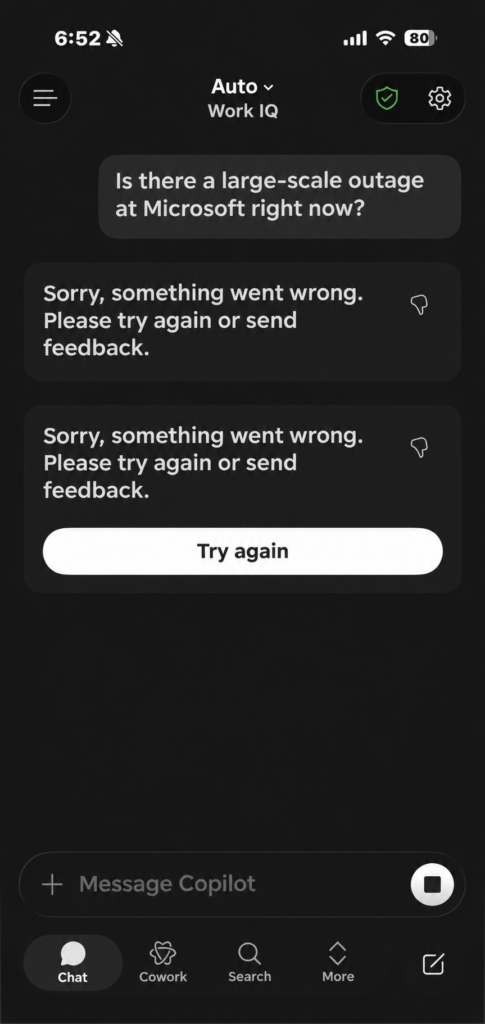
Copilot screenshot reported during the incident: A user observed the Microsoft Copilot Work IQ screen display an error similar to “Sorry, something went wrong. Please try again or send feedback.” A related earlier screen was stuck at “Organizing information…”. Microsoft 365 Copilot appeared among the potentially affected services, but the direct cause of this specific screenshot was not proven.
Was Microsoft 365 restored? Initial status at 6:20 a.m. JST
In its early notifications, Microsoft said switching the health-check method used for affected servers had brought some capacity back, and the company was expanding the approach. It was preparing automatic mechanisms to detect and restart unresponsive servers.
At about 5:57 a.m. JST, both EX1550543 and MO1550821 were still marked as degraded. No definitive time for full restoration was available. A separate, earlier North America-focused Teams incident, TM1550488, had been marked resolved; that did not mean the new widespread Microsoft 365 incident had been resolved.
Check Microsoft’s public service status, or Microsoft 365 admin center > Service health for tenant-specific notices.
What caused the outage? Failed server health checks and concentrated load
Microsoft’s initial explanation was that some backend servers failed automated health checks and were removed from the set of servers available to process customer connections. Traffic was then concentrated on the remaining servers, placing them under additional strain. Microsoft had not established that an unusual surge of users initiated the outage.
In a cloud system, several servers usually share the workload. A health check ordinarily protects users by withdrawing a machine judged unhealthy. But if usable capacity is incorrectly removed or several machines become unavailable, the remaining servers may not be able to handle the same traffic. Users then experience timeouts, mailbox connection errors or intermittent failures.
Microsoft said it was investigating the health-check components and whether certain recent configuration changes contributed. At the time of the report, neither a finalized root cause nor a related compromise or personal-data leak had been established.
What users can do now
- 1. Check the incident notice first: Consult Microsoft’s public service status or workplace instructions. If you use an organization account, pass incident IDs EX1550543 and MO1550821 to your administrator.
- 2. Try an alternate interface once: If the desktop Outlook client is unavailable, try Outlook on the web. If a Teams client fails, try Teams in a web browser. The same backend outage may affect both, so neither is a guaranteed fix.
- 3. Use approved emergency contact paths: Telephone or a separately approved business channel is preferable for urgent communication. Do not move work records or personal data to private email or unauthorized cloud storage.
- 4. Avoid repeated clicks and resends: When email submission is uncertain, check Sent Items and verify receipt before sending again. Duplicates may be delivered once queues recover.
- 5. Hold off on drastic local changes: This incident alone does not justify deleting Outlook profiles, reinstalling Microsoft 365 Apps, resetting authenticator enrollment or changing passwords. Perform local troubleshooting only when there is independent evidence of a device or account-specific cause.
Checklist for Microsoft 365 administrators
When many employees report similar failures, identifying Microsoft’s cloud-side incident and assessing tenant impact is generally more efficient than repairing individual PCs one by one.
- Service health: Review EX1550543 and MO1550821, affected tenant services, current incident notes and Microsoft’s scheduled bulletin time in the admin center.
- Endpoint isolation: Test an affected account in both app and browser, or from different endpoints and networks. Both may fail during the same cloud outage.
- Identity and network checks: Review Microsoft Entra ID sign-in logs and recent proxy, DNS and firewall changes when relevant. A coincidental timestamp alone does not prove a local policy change caused the issue.
- Email diagnosis: Distinguish Exchange Online access/delivery degradation from unrelated SMTP recipient rejection or sender-IP blocking errors. Check queued, sent and potentially duplicated messages.
- Staff communication: Clearly state the provider-side problem, impacted features, that the restoration time is unknown, and the company’s approved urgent-contact method.
For routine troubleshooting outside the widespread incident, see the site’s earlier Teams/Outlook connectivity guide. An Outlook.com delivery rejection such as S3150 / 550 5.7.1 may have a different cause from this Exchange Online connection outage; see the error-specific email blocking guide.
Timeline: November 13, 2026 (Japan Standard Time)
| Time (JST) | What the Microsoft incident record or later update said |
|---|---|
| About 1:17 a.m. | Exchange Online connection incident EX1550543 began according to Microsoft’s record. |
| About 3:26 a.m. | Multi-service Microsoft 365 incident MO1550821 began. |
| Around 4 a.m. | Microsoft described server health-check failures and load shifted onto remaining infrastructure. |
| About 5:57 a.m. | Alternative health checks had shown improvement on some servers; Microsoft worked on wider rollout and automatic recovery measures. |
| About 7:03 a.m. | Recovery steps had not produced the expected effect; overburdened central processes and server isolation/restarts were discussed. |
| About 8:58 a.m. | Limited regional recovery and some stable restored servers were reported, but full restoration remained unconfirmed. |
| About 3:14–3:16 p.m. | Microsoft still marked EX1550543 and MO1550821 as service degradation and was investigating traffic-control and routing measures. |
Times above were converted from UTC in Microsoft’s incident notifications to JST (UTC+9). They describe official records and updates, not necessarily the first moment each individual user noticed a failure.
FAQ: Japan impact, Windows Update and sign-in security
Q. Could Outlook failures in Japan be part of this incident?
Yes. Microsoft said users could be affected regardless of region. However, you must compare an individual user’s symptoms and tenant against the relevant notice; not every Outlook error has the same cause. The total number of affected users in Japan was not confirmed in the initial report.
Q. Would uninstalling a Windows Update fix it?
There was no verified link between this cloud-side Microsoft 365 incident and a specific Windows Update. As a general response, do not uninstall Windows patches merely because Outlook is unavailable.
Q. Must I reset my password or reconfigure Microsoft Authenticator?
No. The outage itself was not evidence that your credentials had been stolen, and changing passwords or MFA registrations may create additional account-access problems. If there is separate evidence of account compromise, follow the relevant security procedure.
Q. Were all personal Microsoft 365 and Outlook.com users affected?
The official EX1550543/MO1550821 notices primarily concerned organizational Microsoft 365 services including Exchange Online. You cannot assume that consumer Outlook.com or every personal Microsoft 365 subscription was identically affected. Check the status of the account and service you actually use.
Summary: Verify Microsoft’s incident IDs before treating this as a PC fault
The November 13 incident was associated with Microsoft cloud health-check failures and overloaded backend capacity. If Outlook, some Teams features, SharePoint-connected workflows or Copilot are failing, check the official incident notices before applying disruptive device-level fixes. For email-dependent bank verification, follow the bank-specific guidance above rather than repeatedly resetting accounts or requesting codes. This report describes the status known on November 13, not an evergreen claim that the outage is still ongoing.
Primary sources, related reading and update history
- Microsoft’s public service status; Microsoft 365 admin center > Service health (requires appropriate organization permissions).
- University of Pennsylvania’s public copy of Microsoft admin-center incident notifications — public copy of EX1550543 and MO1550821 notices, including UTC timestamps.
- Kyoto University’s official notice; Hiroshima University’s official notice; Otsuka Corporation’s customer notice.
- Rakuten Bank’s November 13 notice; Japan Post Bank’s November 13 notice (updated at noon); GMO Aozora Net Bank’s November 13 notice.
- Reuters, November 12, 2026: Microsoft 365/Outlook outage reports in the United States.
- BleepingComputer: Microsoft 365 incident IDs, services and recovery measures.
- Japanese original on Pirorin Tech: Microsoft 365 outage on November 13, 2026.
Update history retained from the Japanese original: first published November 13, 2026 around 6 a.m. JST; later bulletins at about 7:10 a.m., 9:14 a.m. and 3 p.m.; bank impacts added November 13. English edition translated from the original as saved at 4:04 p.m. JST. Some restoration and next-bulletin times above were correct at publication but may have passed. Direct service and incident status should be checked with Microsoft.